
Trackers
Ad tracker services for managing and optimizing traffic with a variety of features and pricing plans.
Operation system
- Alphabetical order
- By date





What trackers does an affiliate need?
Top trackers for traffic arbitrage
A tracker is the first tool an affiliate buys after the ad account, and the one most often configured in a hurry. It answers the single question that decides your budget: which creative, placement and GEO brought the player who deposited. What follows covers how trackers for traffic arbitrage are built, what you actually pay for, what GEO rules change, how a server-side postback works and where setups usually break.
What a traffic arbitrage tracker does
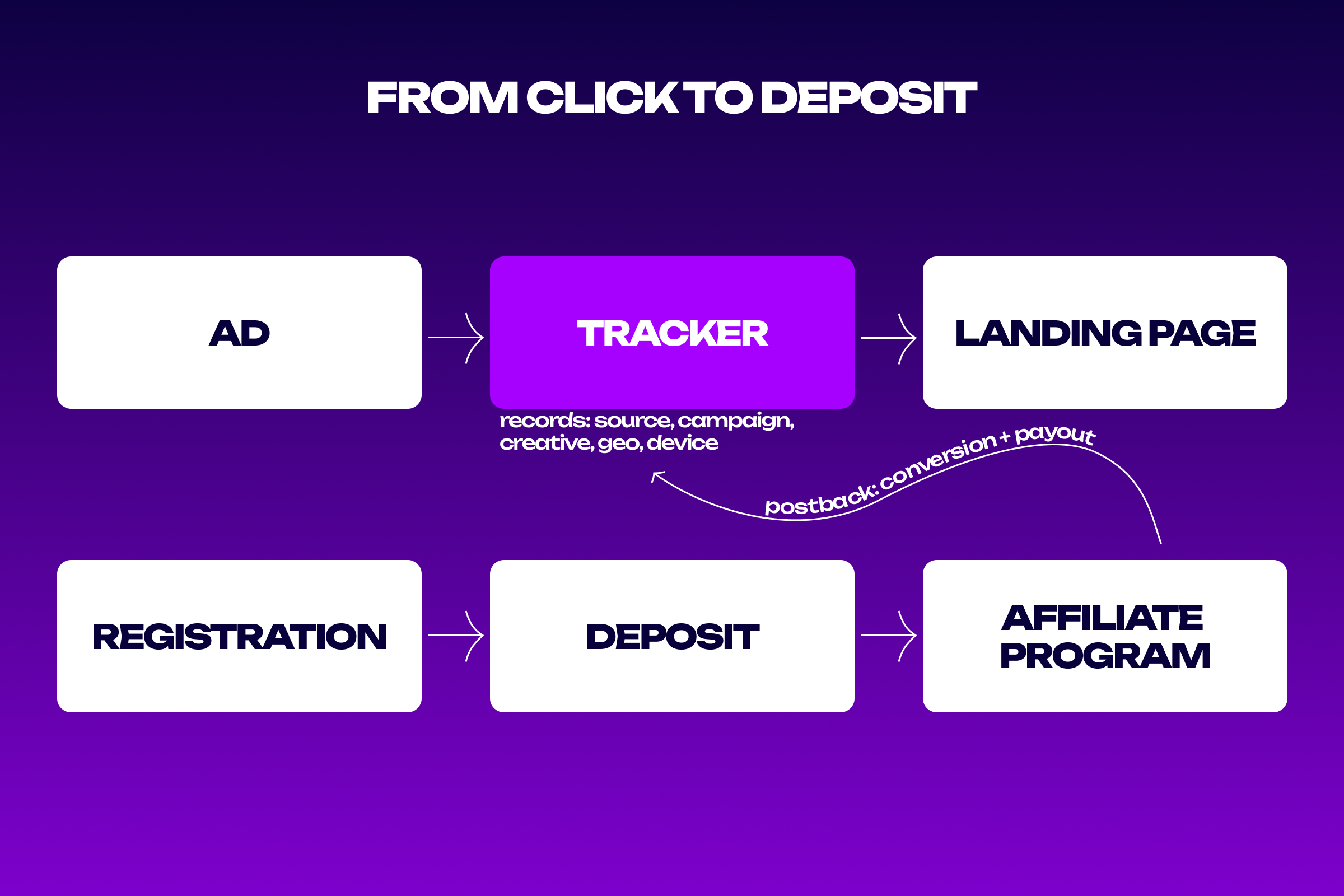
A traffic arbitrage tracker sits between the ad and the landing page. The visitor taps a banner, arrives at the tracker’s technical link, and within a fraction of a second the system records the parameters of that visit: source, campaign, creative, placement, GEO, device type, mobile carrier. The visitor then continues to the landing page and notices nothing unusual. Parameters arrive automatically through tokens that the traffic source appends to the URL. That makes the link template more important than the tracker settings themselves: a missing token means an entire slice of data never gets collected, and nothing can rebuild it later. After that the tracker waits. The player registers, deposits, the affiliate program records the conversion and reports it back. At that moment the chain closes and the payout attaches to one specific ad. An ad account never produces that view. It shows impressions, clicks and cost per click, but not which banner brought the person who paid. Closing that gap is the whole job.
Types of trackers: cloud and self-hosted
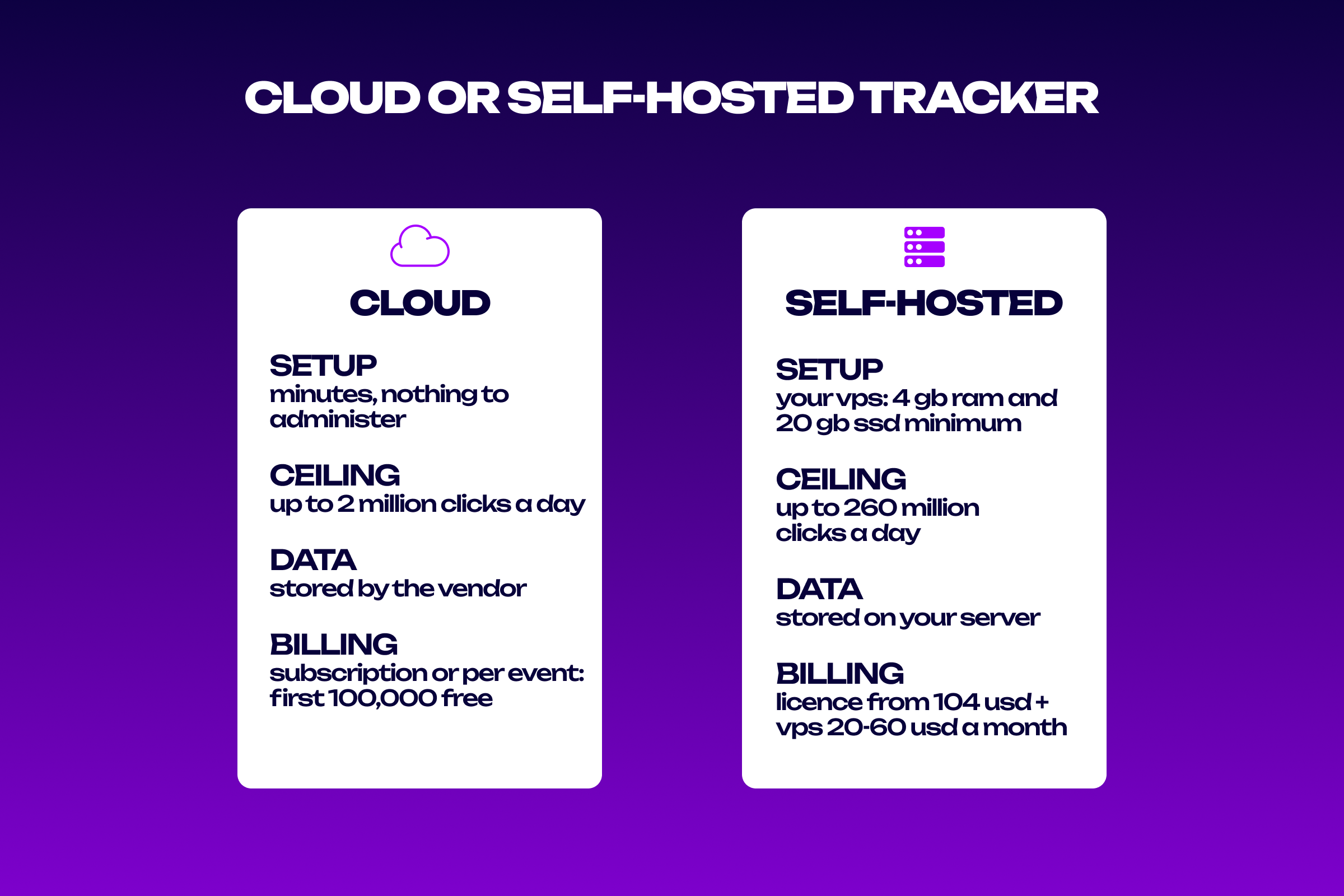
Trackers split into two categories by deployment, and the difference touches everything from launch speed to who owns your data. A cloud tracker runs on the vendor’s infrastructure. Registration takes minutes, there is nothing to administer, and updates arrive on their own. A self-hosted build sits on your own VPS, wants a clean system with at least 4 GB RAM and 20 GB SSD, and leaves everything from updates to backups in your hands.
Three criteria settle the choice.
- Traffic volume. A cloud version holds around 2 million clicks per day and a self-hosted one up to 260 million, a gap reaching one hundred and thirty times. Until you approach the first figure, migrating is pointless.
- Data sensitivity. Self-hosted keeps statistics on your own machine, beyond any vendor’s reach. In gambling that carries weight, because GEO and funnel data is the asset itself.
- Willingness to administer. A self-hosted build needs someone able to keep a VPS alive. Without that person, savings on the plan get eaten by downtime.
Historical data rarely migrates between systems, which makes switching trackers mid-campaign genuinely painful. Choose once and leave headroom.
How trackers charge
Four billing structures exist in this category, and none is better on its own: volume and how evenly it spreads across the month decide everything.
| Model | What you pay for | Typical range | Who it suits |
|---|---|---|---|
| Flat subscription | access, regardless of event count | from 40 EUR a month on annual billing | steady volume across several funnels |
| Metered billing | every click and every conversion | first 100,000 events free, a million around 49 USD, two million around 69 USD | launch and first tests |
| Self-hosted licence | the right to install on your own VPS | from 104 USD annually or around 149 USD monthly | large volumes and data residency requirements |
| Capacity pricing | throughput rather than events | ceilings from 2 to 260 million clicks per day by plan | campaigns with sharp traffic spikes |
A flat subscription costs more at the start yet never grows with traffic. Metered plans are cheaper for a newcomer still inside the first hundred thousand events, but a spike turns into unexpected overage. Costs outside the price list apply too. A self-hosted build needs a VPS at another 20 to 60 USD a month, plus domains for each funnel and sometimes an administrator. Cloud products carry none of that, so the real gap at launch is wider than the published tariffs suggest. Read past the headline number. Domain limits cap how many funnels run in parallel, user limits decide whether a team can share the account, and log retention determines whether last quarter’s statistics can still be pulled. Nearly every service offers one to two weeks of trial, and using it before the first payment is worth the delay.
GEO and localisation inside the tracker
GEO in a tracker is not a column in a report but a set of rules that split traffic across landing pages and offers. One campaign covering five countries without those rules turns into wasted budget: the visitor meets an unfamiliar language, a foreign currency and a payment method unavailable to them. The minimum rule set worth configuring right after setup looks like this.
| What GEO splits | Example rule | What breaks without it |
|---|---|---|
| Landing page language | country selects the language version | the visitor meets an unfamiliar language and returns to search |
| Offer currency | country selects an offer in the local currency | the deposit fails at the payment step |
| Device type | mobile traffic goes to the app, desktop to the web version | conversion drops on the wrong format |
| Mobile carrier | a separate flow for specific carriers | click attribution fails to collect in some GEOs |
| Excluded GEOs | countries outside offer terms hit a stub page | traffic is paid for and produces no conversions |
Check the time zone separately. A tracker on one zone and an affiliate program dashboard on another will produce daily figures that never match, turning every reconciliation into an investigation.
Licensing, data and the legal side
Licensing works differently here than elsewhere in the stack. Cloud services sell a subscription to access, while self-hosted products sell an installation licence usually tied to a seat count or a single install key. Passing that key to contractors without a separate agreement breaches the terms. Data storage is the second question. A tracker accumulates IP addresses, device identifiers and behavioural markers, which counts as personal data under European regulation. If you run European GEOs, the working minimum is a self-hosted build in a jurisdiction that suits you, a configured log retention period and a policy published on the landing page. The third question is purely practical. Tracker domains have short lives and get banned alongside funnels, so buy them in batches and keep spares. A burned domain means lost data for every campaign that ran through it.
Integrations and the server-side postback
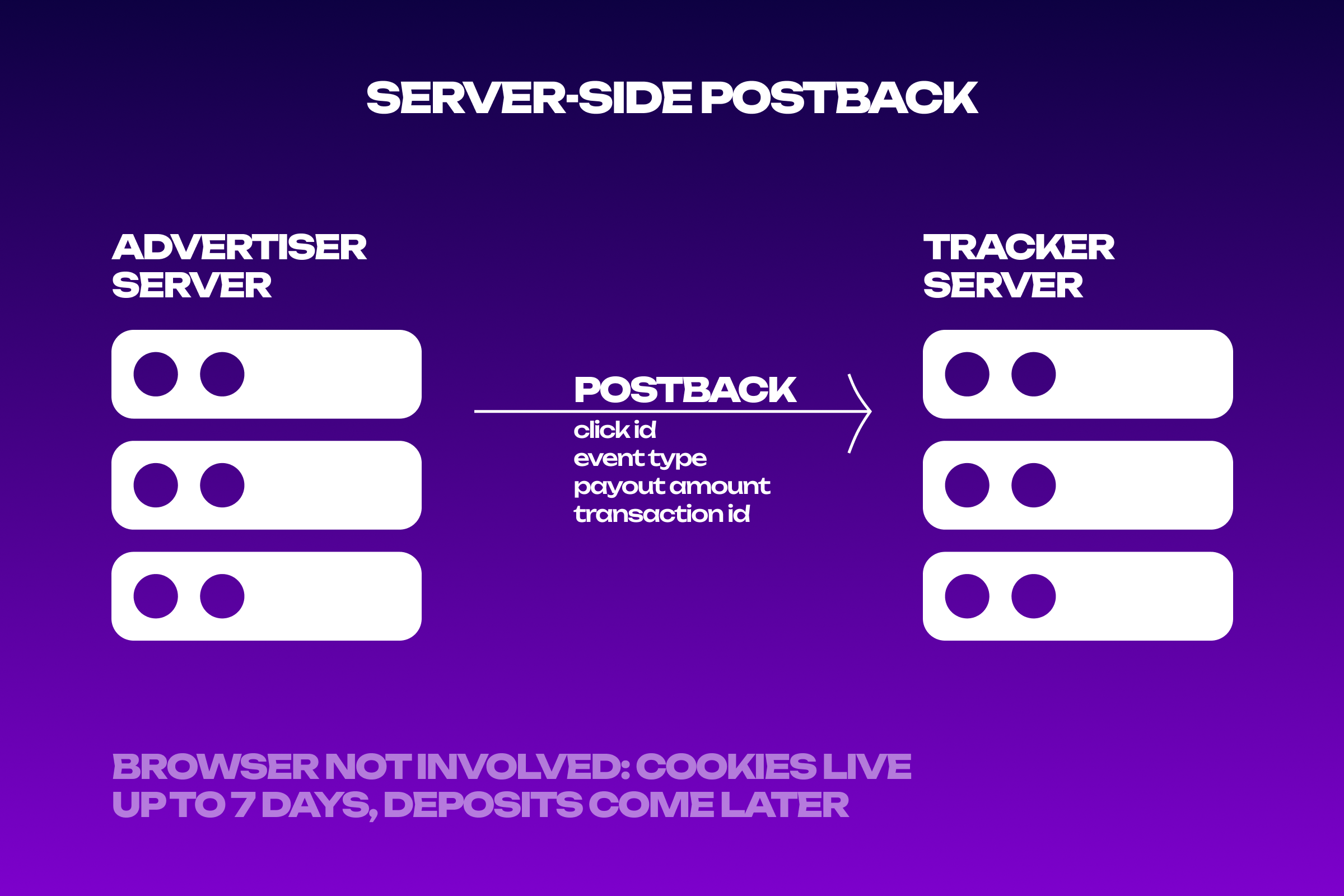
A tracker creates no data by itself. It lives on two integrations: one with the traffic source, which supplies click parameters, and one with the affiliate program, which supplies conversions. The first runs on tokens in the link, the second on postbacks. Gambling makes the server-side postback non-negotiable. Players deposit days or weeks after the click, while privacy-hardened browsers cap the lifetime of a script-set cookie at seven days. Those browsers account for roughly 20% of global web traffic, and every conversion from them disappears from a cookie-based report.
For a postback to be useful, four parameters have to arrive with it.
- The click ID, which lets the tracker find the exact click and retrieve everything stored against it.
- The event type, so registrations and deposits do not collapse into one number in the report.
- The payout amount, without which per-creative ROI cannot be calculated at all, only conversion counts.
- The transaction ID, needed for weekly reconciliation against the affiliate program dashboard.
The postback URL with macros goes into the affiliate program dashboard, and before releasing budget it is worth asking the manager to fire one test conversion. That single event shows whether every parameter reached the report, and it costs nothing. The integration list for each service sits in the cards above and directly determines how long setup will take.
Common setup mistakes
Mistakes at this stage repeat themselves, and nearly all produce the same symptom: numbers exist, usefulness does not.
- A token lands in the wrong template field, and an entire data slice goes uncollected. This usually surfaces after the budget is spent.
- A postback goes live without a click ID, so conversions arrive but never attach to a creative.
- The tracker domain gets banned along with a previous funnel, and part of the traffic disappears into nothing.
- The tracker time zone disagrees with the affiliate program’s, and daily reports drift by a constant amount.
The most expensive tracking mistake costs time rather than money. A reporting mismatch takes weeks to trace and usually hides in a single field filled out carelessly during setup. Once connected, tune the tracker to your workflow: write the traffic distribution rules, enable automatic filtering by GEO and device, schedule recurring reports. Alongside the rest of your affiliate services, that clears routine work off the buyer’s desk.
FAQ
Do I need a tracker for a single funnel?
With one funnel and no traffic splitting, ad account reporting and a spreadsheet will cover you. A tracker starts paying off from the second funnel, once creatives need comparing against each other. A free tier of 100,000 events covers that stage at no cost.
How does a postback differ from a pixel?
A pixel is a script in the user’s browser, while a postback is a call between servers. Pixels depend on browser settings, blockers and cookie lifetime, and postbacks depend on none of that. For the long path to a deposit, only the second option holds up.
What does a tracker cost at the start?
Nothing, if you take a free tier covering the first 100,000 events. Beyond that a million events runs about 49 USD a month, while flat subscriptions open at 40 EUR on annual billing. A self-hosted licence starts at 104 USD, with a VPS on top.
Should a beginner choose cloud or self-hosted?
Cloud. It launches in ten minutes, needs no administration and covers volumes up to 2 million clicks a day. Moving to your own server makes sense once you hit that ceiling or once metered billing costs more than a flat subscription.
Why do tracker and affiliate program figures disagree?
A small gap is normal: time zones, crediting rules and postback delays produce a difference of a few percent. Anything larger points at the postback configuration or the time zone, and after checking both, raise it with your programme manager.
Conclusion
A traffic arbitrage tracker exists for one decision rather than for charts: where the next budget goes. It joins the click to the deposit, shows ROI at creative level and splits traffic by GEO, language and device without manual work. When choosing a service, weigh the billing model against your volume, check the deployment type, read the integration list and confirm how server-side postbacks are implemented. Trials exist for exactly this, and running one before the first payment is worth the wait. Current pricing, integrations and trial terms for every tracker are collected in the cards above.