
28.10.2026


Mark Novak
Author
Proxies in iGaming: How to Work with GEO, Ads and Market Data
Imagine a team preparing a campaign for a new market. The creative is translated and the link opens, but a visitor from the target country sees a different currency or lands on a generic page instead of a local one. A check from the office may not reveal this error: what a site shows depends, among other things, on the region the visitor connects from.
Proxies for iGaming help check such differences and collect data by GEO — the country or region of the audience. Their value depends on the specific task: comparing offers, checking an ad click-through, or reproducing an error on a site.
Why iGaming Teams Need Proxies
Proxies are used for regional checks. They route a request through an intermediate node, and the site sees its external IP. If the content depends on the IP’s geolocation, the team can check it from the chosen region.
This is how proxies are used in affiliate marketing: to research a market before launching a campaign and to check the visitor’s path after clicking an ad.
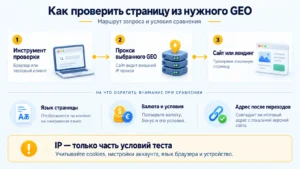
At the same time, a proxy does not change the browser language, cookies (data a site saves in the browser) or account settings. So the connection region has to be considered together with the other test conditions.
GEO Analysis and Market Research
GEO proxies help compare public pages and search results from different countries. Competitor analysis becomes more useful when a team records not only the bonus amount, but also the terms of the offer.
Say you need to compare welcome offers in two markets. A large amount on a banner does not mean better terms: check the minimum deposit, the wagering requirements and how long the bonus is valid.
For each observation, it is worth recording:
- the connection country, URL and time of the check;
- the currency, the offer amount and the published terms;
- the page language and the site version selected.
With regular monitoring, keep the comparison conditions identical. Changing cookies or language between checks can affect the result. A loading error on its own does not mean that a competitor removed an offer.
Ad Verification and Local Content Checks
Proxies for ad verification help check the availability and content of a page from the target region. In ad verification — checking ad placements — this is one way to control where an ad leads and what opens after the click.
First, check the ad in the ad platform’s preview tool. Then open a test link through a proxy: check the redirect chain, the final URL, the language, the currency and whether the landing page matches the creative. For example, a bonus promised in the local currency should lead to a page with the same terms.
GEO testing does not guarantee that a specific ad will be shown: audience settings and the ad auction affect it. Use the verification tools the platform provides, and do not create artificial clicks or impressions.
How to Choose a Proxy Type for the Task
Choose the network type and the IP rotation mode based on the conditions of the check. For a single sequential test, a stable connection matters; for reviewing several markets, the available countries matter.
Residential proxies
IP addresses from consumer networks suit regional checks and monitoring of public pages. If you need several linked page visits, choose a mode that keeps the IP for the duration of the session. Check the available duration with the provider.
Static ISP proxies
A static ISP proxy uses an internet service provider’s IP on server infrastructure. A fixed address is convenient for repeat tests from one country. It keeps the network conditions the same between checks, although cookies and browser settings still have to be controlled separately.
For example, MangoProxy offers residential, static ISP, datacenter and mobile proxies. The promo code SHARKLINK gives a 7% discount on MangoProxy static ISP proxies.

Mobile proxies
They are chosen when you need to check access through a mobile carrier’s network. Such an IP does not turn a desktop browser into a smartphone: responsive layout and the mobile interface are checked on a device or in a suitable test environment.
Datacenter proxies
They suit technical availability checks and automated requests, if the target site allows such access. A result obtained through a server IP should not automatically be taken as what a user on a home network sees.
What to Pay Attention to When Working with Proxies
Before launch, check the actual connection in the browser or tool where the test will run. A correct entry in the settings does not yet confirm that the request went through the right address.
A short checklist:
- compare the external IP and its country with the target GEO;
- choose a fixed address or rotation (changing the IP) depending on the scenario;
- match the test duration to the IP retention conditions and check its stability;
- check that your tool supports HTTP(S) or SOCKS5;
- follow the site’s rules, access terms and acceptable request frequency.
When collecting public data, set request intervals in advance and record errors separately from substantive results.
FAQ
Do I need an account to research a market?
Public offers can be studied without registration, if the site gives access to them. To check closed sections, use only authorized access: a proxy does not grant additional rights.
Practical Takeaways
Comparing markets requires suitable GEOs and identical observation conditions. For repeatable tests from one country, a static ISP proxy is convenient. A mobile network makes sense when its specifics are part of the check.
The main mistake is to treat the IP’s country as a full copy of the user’s environment. Match it with the language, the session state and the device, and save the results together with the test conditions. Then differences between checks will be easier to explain.
Mark Novak
Author
Similar articles by the author



Leave a comment
Thank you for your feedback!
Your review will be published after moderation.